Dive into the world of e-book formatting tips and discover how to make your e-book stand out with professional design and layout techniques. From optimizing images to selecting the perfect font, this guide has got you covered!
Get ready to take your e-book formatting skills to the next level and create a reading experience that your audience won’t forget.
E-book Formatting Tips
When it comes to creating an e-book, formatting plays a crucial role in ensuring a seamless reading experience for your audience. Consistent formatting not only enhances the overall look of your e-book but also improves readability, making it easier for readers to navigate through the content. In this guide, we will explore some essential tips for formatting your e-book effectively.
Importance of Consistent Formatting
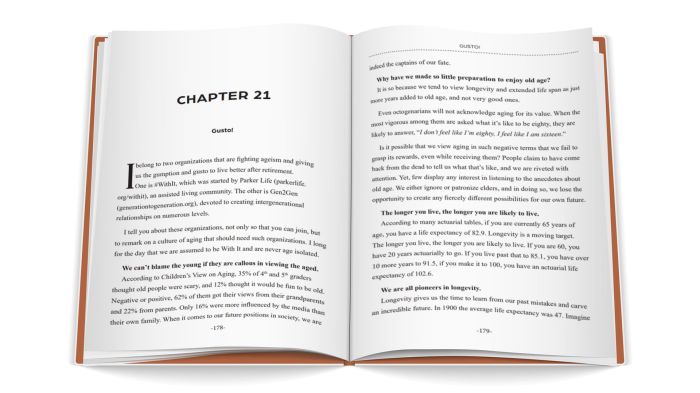
Consistent formatting is key to providing a visually appealing and professional-looking e-book. When all elements such as headings, fonts, spacing, and alignment are consistent throughout the e-book, it creates a sense of cohesion and makes the content more engaging for readers.
Formatting Elements for Readability
To enhance readability, consider using elements such as:
- Clear headings and subheadings to break up the text.
- Ample white space for easier scanning.
- Bullet points and numbered lists for presenting information concisely.
- Proper alignment of text and images for a clean layout.
- Use of readable fonts and appropriate font sizes for different sections.
Optimizing Images for E-books
When including images in your e-book, it’s essential to optimize them for digital viewing. Make sure to:
- Resize images to fit the e-book layout without compromising quality.
- Compress images to reduce file size and improve loading times.
- Use high-resolution images for sharp display on various devices.
- Add alt text to describe images for visually impaired readers.
Best Practices for Font Selection and Size
Choosing the right fonts and sizes can significantly impact the readability of your e-book. Here are some best practices to keep in mind:
- Select readable fonts like Arial, Times New Roman, or Calibri for body text.
- Use a consistent font throughout the e-book to maintain visual harmony.
- Opt for a font size of 10-12 points for body text and slightly larger sizes for headings.
- Avoid using decorative fonts or small font sizes that may strain the reader’s eyes.
Creating E-books

Creating an e-book involves several steps to ensure that your manuscript is properly formatted and optimized for digital reading. Converting a manuscript into an e-book format requires attention to detail and understanding of different file formats, compatibility with devices, metadata, and cover design.
Converting a Manuscript into E-book Format
To convert a manuscript into an e-book format, follow these steps:
- Prepare your manuscript in a standard word processing software like Microsoft Word.
- Format your text for readability on various devices by using appropriate fonts, styles, and spacing.
- Convert your manuscript into an e-book file format like EPUB or MOBI using conversion software or online tools.
- Review the converted e-book to ensure that the formatting is consistent and error-free.
- Optimize the e-book for different devices by testing it on e-readers, tablets, and smartphones.
Comparison of E-book File Formats
- EPUB: Widely used and compatible with most e-readers and devices.
- MOBI: Specifically designed for Amazon Kindle devices.
- PDF: Maintains formatting but may not be as flexible for different screen sizes.
- AZW: Amazon’s proprietary format for Kindle e-books.
- DOCX: Can be converted into e-book formats but may require additional formatting.
Significance of Metadata in E-books
Metadata in e-books includes information like title, author, publisher, and description. It helps readers discover your e-book and improves searchability. To include metadata effectively, fill out the metadata fields in your e-book creation software or platform with accurate and relevant information.
Tips for Creating an Appealing Cover Design
To create an appealing cover design for your e-book, consider the following tips:
- Use high-quality images that reflect the genre and theme of your e-book.
- Keep the design simple and eye-catching to attract potential readers.
- Include the title and author name prominently for easy recognition.
- Choose a color scheme that complements the content and attracts the target audience.
- Consider hiring a professional designer for a polished and professional look.
Layout and Design
When it comes to creating an e-book, the layout and design play a crucial role in engaging readers and enhancing the overall reading experience. Let’s dive into some key tips for structuring your e-book effectively.
Structuring Chapters, Sections, and Headings
Organizing your e-book into clear chapters, sections, and headings is essential for guiding readers through your content. Make sure to use descriptive and concise headings that accurately represent the content within each section. This will help readers navigate the e-book easily and find the information they are looking for.
Using Lists, Bullet Points, and Tables
Utilizing lists, bullet points, and tables can help you organize content in a visually appealing and easy-to-read format. Lists and bullet points are great for breaking down complex information into digestible chunks, while tables can be used to compare and contrast data or present information in a structured manner. Incorporating these elements will improve the overall readability of your e-book.
Balancing Text and White Space
Finding the right balance between text and white space is key to creating a visually pleasing layout. Too much text can overwhelm readers, while too little can make your e-book look sparse. Aim to strike a balance by using proper spacing, margins, and font sizes to create a clean and inviting design. White space can help emphasize important content and improve readability.
Creating Hyperlinks and Interactive Elements
Including hyperlinks and interactive elements in your e-book can enhance reader engagement and provide additional value. Hyperlinks can direct readers to external sources for further information, while interactive elements like quizzes, videos, or interactive images can make the reading experience more interactive and immersive. Be sure to test all links and elements to ensure they function correctly.
Tools and Software
When it comes to formatting e-books, having the right tools and software can make a significant difference in the final outcome. Let’s explore some popular options and discuss their pros and cons.
Popular Tools and Software
- Calibre: Calibre is a free and open-source e-book management tool that also offers formatting capabilities. It supports various e-book formats and allows for customization of layouts.
- Sigil: Sigil is another free and open-source software specifically designed for creating and editing e-books in the EPUB format. It provides a user-friendly interface for manual formatting.
- Vellum: Vellum is a paid software known for its sleek and professional templates for e-books. It offers a simple drag-and-drop interface for easy formatting.
Automated e-book formatting tools can save time and effort, but they may not always produce the desired results in terms of customization and design.
Manual Formatting Tips
- Use Styles in Microsoft Word: Utilize the built-in Styles feature in Word to create consistent formatting throughout your e-book. This will help maintain a cohesive look.
- Consider Adobe InDesign: For more advanced users, Adobe InDesign provides powerful tools for precise layout and design of e-books. It offers extensive control over typography, images, and more.
- Optimize Images: When inserting images into your e-book, make sure to resize and compress them appropriately to maintain a balance between file size and quality.
Resources for Advanced E-book Formatting
- Online Courses: Platforms like Udemy, Coursera, and Skillshare offer courses on advanced e-book formatting techniques. These can help you enhance your skills and stay updated on industry trends.
- Books and Guides: Look for e-books or guides dedicated to e-book formatting and design. They often provide in-depth insights and practical tips for creating professional-looking e-books.
Closing Summary
Master the art of e-book formatting with these tips and tricks, and watch as your e-book transforms into a polished masterpiece that readers will love. Start implementing these techniques today and elevate your e-book game!
FAQs
How important is consistent formatting in e-books?
Consistent formatting is crucial as it ensures a seamless reading experience and enhances the overall visual appeal of your e-book.
What are some best practices for font selection in e-books?
Choose easy-to-read fonts and ensure they are legible across different devices to optimize the readability of your e-book.
How can I optimize images for e-books?
Resize images appropriately, compress them for faster loading times, and ensure they are in the correct file format for e-book compatibility.